
Permit Portal

The Online Permit Portal is for permit applications, plans, and documents. Pay fees, find electronic copies of your permits, and request inspections - all in one location. All permit applications, plans, and documents must be submitted through the Online Permit Portal.
Setting Up Your Account
The Online Permit Portal is operated through OpenGov. If you are new to OpenGov, here is how to sign up for the first time and use the Permit Portal (please note: if you have already created an account with OpenGov, you do not need to register again - even if you created an OpenGov account with a different agency or city):
1. Go to the Online Permit Portal page.
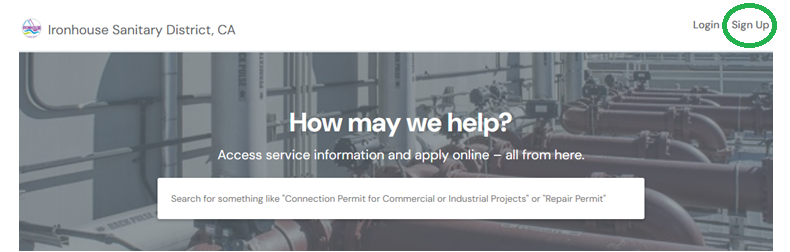
2. Select the "Sign Up" button located in the upper right hand corner of the page (circled in green):
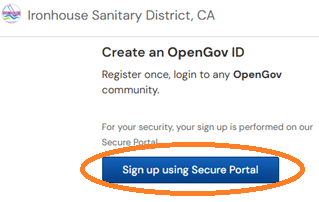
3. Select "Create an OpenGov ID" by clicking on the "Sign up using Secure Portal" button on the left side of the page (circled in orange):
4. Enter your email address and create a password you wish to associate with your OpenGov account when logging in. Follow the directions to verify your email.
How to Request an Inspection
Once you are logged into the Permit Portal website and you need to request an inspection:
- Step One: From the homepage, click on "My Account" (circled in yellow)

- Step Two: Find the permit under, "Applications" or look for it in your "Action Required" list. From the "Applications Menu," select the permit record for inspection. Otherwise, select the inspection you want to request.

- Step Three: Select the inspection step in the workflow and use the “New Appointment” button to submit your inspection request

Next Steps:
- Select the date you would like to have the inspection. Specify if your prefer an AM or PM inspection - or select both
- Fill out contact information for the project representative who will be present at the inspection
- Add additional information you think Ironhouse should know about (lot numbers, locations, etc.) and then submit your request
Remember:
- Inspections occur Monday through Thursday
- To request an inspection, you must be the applicant or an added collaborator on the permit
- Inspection requests are not guaranteed until confirmed by an inspector
- You can review requested, scheduled, and past inspections for your permit in the Online Permit Portal
Permit Types
Ironhouse issues several types of permits related to the sewer including connection, repair, and discharge permits. If you are curious which permit type applies to your project, please read the descriptions below.
Types of Permits
1. Certificate of Compliance Permit
If your property requires a Closed-Circuit Television (CCTV) inspection as triggered by Ordinance No. 65, you should apply for a Certificate of Compliance permit. If there are any violations identified in the sewer lateral, you will receive a Notice of Violation and be required to apply for a separate repair permit.
Please see Sewer Lateral Inspection Program FAQs for more information.
2. Repair Permit
If your property’s sewer lateral is in need of repair and/or you have received a Notice of Violation from a previously submitted CCTV inspection, you should apply for a Repair Permit.
3. Connection Permit for Residential Projects
If your residential property is not connected to the sewer mainline in the street but you want to receive sewer service, you should apply for a Connection Permit for Residential Projects. This permit type is appropriate for residential properties including single- and multi-family homes as well as mobile home and RV parks.
4. Connection Permit for Commercial or Industrial Projects
If your commercial or industrial property is not connected to the sewer mainline in the street but you want to receive sewer service, you should apply for a Connection Permit for Commercial or Industrial Projects. This permit type is appropriate for commercial and industrial projects including tenant improvement and change of use projects.
5. Connection Permit for Tract Projects
If you are a developer and are applying for sewer service for multiple parcels at the same time, you should apply for a Connection Permit for Tract Projects.
6. Sewer Mainline Permit
If the project involves constructing new sewer mainline in the street, you should apply for a Sewer Mainline Permit.
7. New Pool Construction Projects
If you are constructing a new pool or spa on your property and require ISD approval, you should apply for New Pool Construction Projects.
Please see Pool Permits & Discharge Permits FAQs for more information.
8. Pool & Spa Discharge Permit
If you need to drain an existing pool or spa in the sewer system, you should apply for a Pool & Spa Discharge Permit.
Please see Pool Permits & Discharge Permits FAQs for more information.
Important Information - Please Read
Please be sure to review the following while applying for a permit:
· Attachments are accepted in PDF or JPEG format only.
· Payment may be made by credit card or ACH through the Portal or by check submitted to the Ironhouse Sanitary District office. Cash is not accepted.
· Payments are non-refundable.
· Inspections that are requested through the Ironhouse Permit Portal, which occur Monday through Thursday, and require 48 hours prior notice.
· We strive to respond to most permit types including pool and sewer lateral compliance certificates within two business days. If you would like a status update on your permit application, please reach out to the permit coordinator through the Portal or via email permits@isd.ca.gov.
If have questions about the Portal or need help applying for a permit, please contact permits@isd.ca.gov or submit a Help Ticket through the Ironhouse Permit Portal.
Additional Resources
ISD Lateral Conditions of Permit
ISD Sewer Main Standard Conditions
Fee Schedule – Permit Fees for FY 26-27
Fee Schedule – Capacity Fees for FY 26-27